




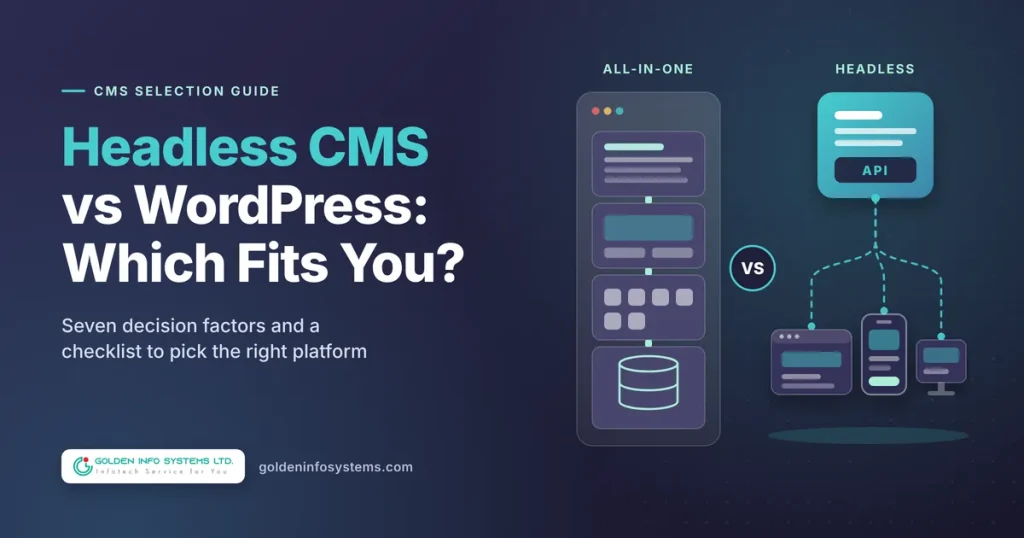
For most growing businesses, traditional WordPress is the better choice: it launches faster, costs less to run, and lets your marketing team publish without waiting on a developer. A headless CMS wins when the same content has to feed several front ends (a website, a mobile app, an in-store screen, a partner portal) or when you need a custom React or Vue front end that no theme can deliver. So the headless CMS vs WordPress decision comes down to two questions: how many channels you publish to, and who will maintain the front end after launch.
There is also a third option that many comparisons skip. You can keep WordPress as the editing back end and replace only its theme with a separate front end, which is usually called headless WordPress. It keeps the editor your team already knows while giving developers full control over the code that visitors see.
This guide explains each option in plain terms, compares them across seven decision factors, gives you a side-by-side table and a step-by-step checklist, and lists the mistakes we see most often. We wrote it for founders, marketing heads and CTOs who have outgrown a basic site and need to pick a platform they won’t have to replace in two years.
1. Headless CMS vs WordPress: What Each Option Actually Is
The words get used loosely, so it helps to pin them down before comparing anything. A content management system has two jobs. It stores and organizes content for editors, and it turns that content into pages for visitors. The difference between the options is whether one system does both jobs or the jobs are split.
How traditional WordPress works
In a standard install, WordPress does both jobs on one server. Editors write in the block editor; WordPress saves the content to a MySQL database; a PHP theme pulls that content and renders the HTML that each visitor receives. Plugins hook into the same process to add forms, SEO tags, caching, e-commerce and almost anything else you can name.
That single-system design is the reason WordPress is everywhere. According to W3Techs, WordPress runs 40.1% of all websites and holds 58.6% of the CMS market as of October 8, 2026, far ahead of Shopify at 5.4% of all sites. In practice, that market share means a large pool of developers, themes, plugins and hosting companies, and it means your next hire has probably used it before.
How a headless CMS works
A headless CMS keeps only the first job. It gives editors a place to create structured content (articles, products, team members, FAQs) and exposes that content through an API, usually REST or GraphQL. It does not produce web pages at all. The “head,” meaning the front end, is a separate application your developers build, often with Next.js, Nuxt or Astro.
Popular dedicated platforms include Strapi, Sanity, Contentful and Storyblok. Some are open source and self-hosted; others are hosted services billed by seats, records or API traffic. Because the content arrives as clean data rather than finished HTML, the same entry can appear on your website, inside your iOS and Android apps and on a digital signage screen without being copied.
Headless WordPress: the middle option
WordPress can also run headless. The WordPress REST API handbook states that the API lets you “bring your WordPress content into completely separate applications,” and every modern WordPress site already ships with it. Teams that prefer GraphQL use WPGraphQL, a plugin that Matt Mullenweg announced was becoming canonical on WordPress.org on October 7, 2024.
With this setup, editors keep the familiar WordPress dashboard, while a Next.js or Nuxt application fetches the content and renders the pages. You get some headless benefits without retraining your content team. You also lose some WordPress conveniences, which we cover in the next section.
Why the choice matters for a growing business
Platform changes are expensive. Moving a 300-page site between systems means rebuilding templates, mapping old URLs to new ones and re-entering or migrating content, so the platform you choose now will shape your web budget for years. Picking headless too early adds cost you don’t need. Picking a monolithic theme when you already plan a mobile app means paying to restructure content later.
2. Seven Factors That Decide the Headless CMS vs WordPress Question
Every vendor will tell you their architecture is the modern one. Ignore the label and score your own project against these seven factors instead.
Factor 1: How many channels you publish to
This is the deciding factor more often than any other. If your content only ever appears on one website, a headless architecture solves a problem you don’t have. If the same product descriptions, course details or store locations must appear on a website, a mobile app and a partner portal, a headless setup lets editors update one record and see it everywhere.
Here is a hypothetical example. A training institute runs a website, an Android app for enrolled students and a lobby screen that lists upcoming batches. With traditional WordPress, staff would update course dates in three places; with a headless CMS (or headless WordPress), they update one course record and all three screens refresh. For that institute, the headless CMS vs WordPress question answers itself.
Count real channels, not hypothetical ones. A mobile app that is “maybe next year” should not drive this year’s platform decision, although it is a good reason to structure content cleanly in whatever system you choose.
Factor 2: Editor experience and live preview
Traditional WordPress gives editors a visual editor and a preview button that shows the real page. That preview is the feature marketing teams miss most after a headless rebuild. In a headless setup, preview has to be built: the front end needs a draft route (Next.js calls this Draft Mode) that fetches unpublished content with an authentication token.
Dedicated platforms handle this differently. Storyblok is built around a visual editor, and Sanity offers configurable editing studios, while a bare self-hosted CMS may give editors only form fields. Ask to see the exact editing screen your team will use, with your content model, before you commit.
Factor 3: SEO handling
With WordPress, plugins such as Rank Math and Yoast write the title tag, meta description, canonical URL, schema markup and XML sitemap for you. In a headless build, the front end must output all of that itself. Both plugins can expose their SEO data through the API (Yoast adds a yoast_head_json field to REST responses, and Rank Math has a headless CMS support setting), but your developers still have to render it, generate sitemaps and manage redirects.
Rendering method matters too. Google’s JavaScript SEO basics guide describes three phases (crawling, rendering and indexing) and says server-side or pre-rendering “is still a great idea because it makes your website faster for users and crawlers.” A headless front end that renders everything in the browser is a self-inflicted SEO risk. Use static generation or server-side rendering for any page you want to rank.
Factor 4: Performance and Core Web Vitals
Headless sites have a reputation for speed because a statically generated Next.js or Astro page can be served from a CDN with very little server work. That reputation is earned, but it isn’t automatic. A heavy JavaScript bundle can still fail Interaction to Next Paint, and a well-built WordPress site with page caching, optimized images and a light theme can pass all three Core Web Vitals.
Google’s “good” thresholds are an LCP of 2.5 seconds or less, an INP of 200 milliseconds or less and a CLS of 0.1 or less, which we explain in our Core Web Vitals optimization guide. Judge any platform by whether your build will hit those numbers on mid-range Android phones, not by its marketing claims.
Factor 5: Security surface
A traditional WordPress site exposes its login page, its PHP code and every active plugin to the public internet. Each of those plugins is extra code that someone has to keep patched. Going headless reduces that exposure because the public site can be static files on a CDN, while the CMS sits on a separate domain that you can restrict by IP address or VPN.
Headless does not remove security work. You now have an API to protect, tokens to rotate and two deployments to patch. The gain is real, but it comes from separating the systems, and you can get part of it with traditional WordPress by locking down the admin area and keeping plugins to a short, maintained list.
Factor 6: Developer skills and hiring
A WordPress build needs PHP, theme and plugin skills, which are easy to find in Bangladesh and almost everywhere else. Headless website development needs JavaScript framework skills (React with Next.js, or Vue with Nuxt), API design, content modeling and CI/CD for the front end. Those developers cost more and are harder to replace.
Think about year three, not launch week. If your agency builds a headless site and then leaves, you need someone in-house or on retainer who can run a Next.js deployment. With WordPress, a much wider pool of freelancers and agencies can pick up the work.
Factor 7: Total cost of ownership
Build cost is only part of the bill. Add hosting for two systems instead of one, SaaS CMS fees if you choose a hosted platform, and the developer time needed for changes that WordPress plugins would have handled. A new landing page template, a form or a cookie banner is a plugin install in WordPress; in a headless site it is usually a ticket for a front-end developer.
As a working estimate from our own scoping (not an industry benchmark), a headless build of a typical marketing site takes about 1.5 to 3 times the development effort of an equivalent custom WordPress theme. The factors that push it toward the high end are custom preview, multilingual content, complex search and e-commerce.
3. Comparison Table: Traditional WordPress vs Headless WordPress vs a Headless CMS
Use this table as a quick reference for the headless CMS vs WordPress choice. It compares the three realistic options on the factors above, assuming a professionally built site in each case.
| Factor | Traditional WordPress | Headless WordPress | Dedicated headless CMS |
|---|---|---|---|
| Best fit | Single website, content-heavy marketing sites, blogs | Teams that love the WordPress editor but need a custom front end or an app | Multi-channel content, apps plus web, complex structured content |
| Editor experience | Visual block editor with built-in preview | Familiar dashboard; preview must be built | Varies by platform; some visual, some form-based |
| SEO tools | Rank Math or Yoast out of the box | Plugin data exposed via API; front end must render it | Built by your developers in the front end |
| Performance ceiling | Good with caching and a light theme | High with static or server rendering | High with static or server rendering |
| Security exposure | Public admin, plugins and PHP | Admin can be hidden; API must be secured | CMS isolated or hosted by vendor; API must be secured |
| Skills needed | PHP, WordPress themes and plugins | WordPress plus React or Vue framework skills | Content modeling, API and JavaScript framework skills |
| Relative build effort (our estimate) | 1x | 1.5x to 2.5x | 1.5x to 3x |
| Ongoing cost drivers | Hosting, premium plugins, updates | Two hostings, two deployments, front-end developer time | SaaS fees or self-hosting, front-end developer time |
| Plugins and marketplace | Huge plugin library | Many plugins do not affect the front end | Smaller app or extension marketplaces |
The table shows why this is not a contest with one winner. Traditional WordPress gives the most for the least effort on a single site, while the two headless options trade higher build and running costs for flexibility across channels.
4. A Step-by-Step CMS Selection Guide for Your Next Website
This CMS selection guide works for a new build or a rebuild. Work through the steps in order, write the answers down and share them with whoever will quote the project.
- List every channel that will show your content in the next 18 months. Include the website, mobile apps, kiosks, email templates and any partner sites. If the list has one item, start with traditional WordPress as your default.
- Map your content types. Write down each type (blog post, service page, product, case study, location, job opening) and its fields. Structured types with many fields lean toward headless; mostly free-form pages lean toward WordPress.
- Name the people who will publish. Note how many editors you have, how often they publish and how technical they are. A marketing team that publishes daily needs reliable preview more than it needs an elegant API.
- Set performance targets. Write the Core Web Vitals thresholds into the requirements and say which pages must pass on mobile. That turns a vague “fast” into a number vendors must meet.
- List required integrations. CRM, payment gateways, analytics, search, translation and marketing automation all need to connect. Check if each one has a WordPress plugin, an API, or both.
- Decide who maintains the front end after launch. If the answer is “nobody in-house,” traditional WordPress or a long-term support contract is the safe path.
- Estimate three-year cost, not launch cost. Add build, hosting, licenses, plugin renewals and an allowance for monthly changes. Compare the three options on that total.
- Run a small proof of concept for headless. Before committing, build one template (for example, the blog post page) with real content, preview and SEO tags. Two weeks of prototype work can save months of rework.
If most of your answers point the same way, you have your decision. If they split, headless WordPress is often the compromise, because it keeps the editor while freeing the front end.
5. Common Headless CMS vs WordPress Mistakes to Avoid
These are the problems we are most often asked to fix after another team has made the platform choice. Each one is avoidable at the planning stage.
- Going headless because it sounds modern. A five-page company site rarely benefits from two codebases. You pay more for builds and changes without gaining a channel.
- Forgetting preview until launch week. Editors discover they can’t see a draft before publishing, and the fix becomes an unplanned sprint.
- Rendering pages only in the browser. Client-side-only rendering slows the first view and makes search engines work harder to index your pages. Use static or server rendering for public pages.
- Dropping SEO metadata in the migration. Titles, descriptions, canonical tags, schema and redirects from the old site must be mapped field by field. Missing redirects alone can erase years of rankings.
- Overloading traditional WordPress with plugins. Thirty or forty plugins, several of them unmaintained, slow the site and widen the attack surface. Keep the list short and review it every quarter.
- Choosing a hosted CMS without checking pricing tiers. Seat, locale and API limits on SaaS plans can push you into a higher tier as the team grows. Read the limits before you sign.
- Hiring a WordPress development company for a headless build (or the reverse). The skill sets overlap less than people assume, so ask for live examples of the exact architecture you are buying.
6. How Golden Info Systems Approaches Headless CMS vs WordPress Projects
At Golden Info Systems, we don’t start with a preferred platform. We start with your channels, your editors and your budget, then recommend the architecture that fits. Sometimes that is a well-built WordPress site. Sometimes it is headless website development with a React or Vue front end. We have delivered 850+ projects over 12+ years, and that range of work is why we are comfortable telling a client that the simpler option is the right one.
Our web development services cover CMS-based websites, custom web applications, e-commerce, and website rescue and optimization, built by a 100% in-house team in Dhaka. Our stack includes React.js, Angular and Vue.js on the front end and Python and CodeIgniter on the back end. GISL is a member of BASIS, the Bangladesh Computer Samity and e-CAB.
Every project follows our four-phase process, which we describe in detail in our software development process guide:
Requirements
We work through the selection checklist above with you: channels, content types, editors, integrations and performance targets. The output is a written requirements document and a clear recommendation on the headless CMS vs WordPress question, with the reasons stated.
Planning
We design the content model, choose the stack and plan the URL structure and redirects. For headless builds, we plan preview, SEO rendering and deployment pipelines at this stage rather than leaving them for later.
Execution
We build in short iterations so your team sees working pages early. Editors test the dashboard with real content before launch, which is when preview and workflow problems are cheapest to fix.
Delivery
We launch, verify Core Web Vitals and SEO tags on the live site, train your editors and hand over documentation. Post-launch support and maintenance plans are available for teams without in-house developers.
When you compare vendors, ask any WordPress development company or headless agency for two live sites built on the exact architecture they are proposing, plus the name of the person who will maintain it after launch. A good partner will also tell you when a cheaper option fits better. We do that routinely, because a client who overspends on architecture is a client who stops trusting the next estimate.
If you are still unsure if you need a content website or a full application, our comparison of web application vs website is a useful companion to this article.
7. Frequently Asked Questions
Is a headless CMS better than WordPress for SEO?
Not by default. Search engines rank pages, not CMS architectures. Traditional WordPress with Rank Math or Yoast handles titles, schema and sitemaps out of the box, so the SEO basics are easier to get right. A headless site can rank just as well, and sometimes loads faster, but only if developers render pages on the server or at build time and output every SEO tag themselves. Most headless SEO problems come from missing metadata and client-side rendering, not from the CMS.
Can WordPress be used as a headless CMS?
Yes. Every current WordPress site includes the REST API, which returns posts, pages and custom content as JSON for any front end to use. Many teams also add WPGraphQL, a canonical plugin on WordPress.org, to query exactly the fields they need. Your editors keep the normal dashboard while a Next.js, Nuxt or Astro app renders the pages. Expect to rebuild preview, menus, forms and SEO output in the front end, since the theme no longer handles them.
Is headless WordPress more secure than traditional WordPress?
It can be. When the public site is static or server-rendered on a separate host, attackers can’t reach your WordPress admin, PHP code or plugins through the website itself. You can restrict the CMS to an IP allowlist or VPN. You still need to secure the API, rotate tokens and keep WordPress and its plugins updated, because the back end still exists. A well-maintained traditional WordPress site with few plugins and strong admin controls is also reasonably safe.
How much more does a headless website cost than a WordPress site?
Based on our own project scoping, a headless marketing site usually takes about 1.5 to 3 times the development effort of an equivalent custom WordPress theme. Ongoing costs also rise, because you host and deploy two systems and pay a front-end developer for changes a plugin would cover. Hosted platforms may add monthly fees tied to seats or API usage. The gap shrinks when you already need a mobile app, since the same content API serves both.
When should a business switch from WordPress to a headless CMS?
Switch when you have a concrete reason, such as a mobile app or second channel that needs the same content, a front end your theme can’t support, or performance targets you can’t hit after proper optimization. Don’t switch only because the site feels slow or dated; a redesign or performance audit usually fixes that for far less money. Run a small proof of concept with one real template before committing to a full migration.
Which is better for a small business website, WordPress or headless?
For most small businesses, WordPress is the better fit. It is cheaper to build and host, editors can publish without developer help, and plugins cover forms, SEO, booking and basic e-commerce. Headless adds value mainly when content must appear across several apps or channels. If you only run one website and a small team updates it, invest the difference in content, design and speed optimization instead.
8. Practical Next Step
Before you speak to any vendor, fill in the eight-step checklist from section 4 on a single page: your channels, content types, editors, performance targets, integrations, front-end owner, three-year budget and one template for a proof of concept. That page settles most of the headless CMS vs WordPress decision on its own. Then send it to our team through the contact page, and we will reply with a recommended architecture and a scoped quote based on your answers.