





Have you ever wished your app framework could actually understand your codebase, fix bugs on the fly, and build a native user interface entirely on its own?
It sounds like science fiction, but this is exactly where mobile and web development is heading today. If you are building apps for Android, iOS, Web, or Desktop, you need tools that help you move faster without breaking under pressure. To answer the question of how you can achieve this today, we need to dive deep into What’s new in Flutter 3.44.
Released alongside Google I/O 2026, Flutter 3.44 is not just a regular quarterly update. It is a massive architectural shift. From introducing AI-powered coding agents that hot-reload your app for you, to finally retiring CocoaPods in favor of Swift Package Manager, this update fundamentally changes how you build digital products.
Last year, you might recall exploring the Top Cloud Infrastructure Trends in 2025: Resilience, Scalability, and Digital Growth. Well, the Flutter 3.44 update takes those exact principles of scalable, resilient cloud growth and applies them directly to your front-end development workflow.
In this comprehensive guide, we will break down exactly what’s new in Flutter 3.44, how it impacts your daily coding routine, and how you can leverage these updates to build premium, lightning-fast applications. Grab a cup of coffee, and let’s dive in!
What’s new in flutter 3.44: The Era of Agentic Hot Reload
If you have been using AI to help you write code, you know the annoying daily struggle: you prompt the AI, it gives you a block of Dart code, you manually copy it, paste it into your IDE, save the file, and manually trigger a hot reload. It works, but it breaks your focus.
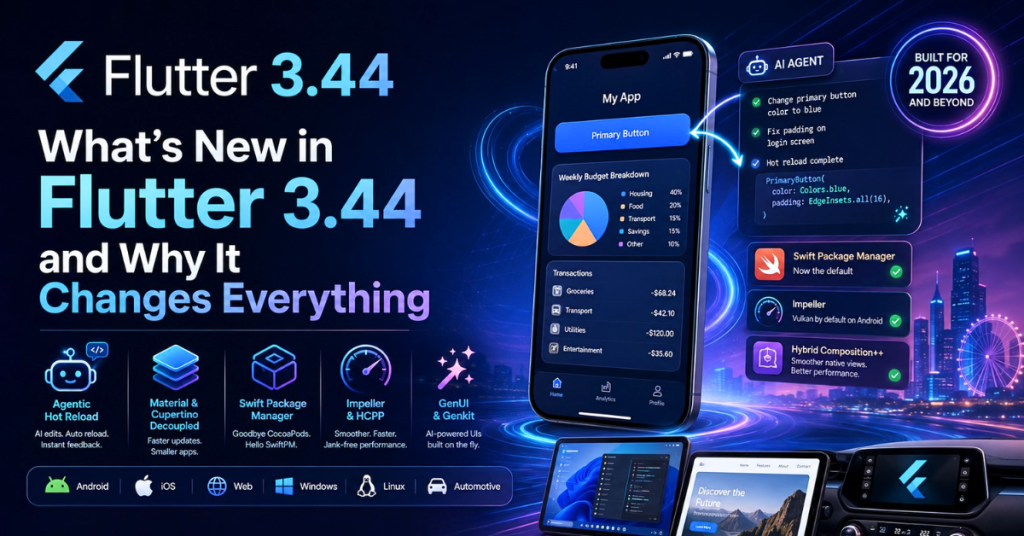
One of the biggest answers to “What’s new in Flutter 3.44” is the introduction of Agentic Hot Reload.
How Agentic Hot Reload Works for You
Thanks to the new Model Context Protocol (MCP) server integration for AI coding agents, your AI assistant can now hook directly into your local Dart environment. Here is what your new workflow looks like:
- You prompt your local AI agent: “Change the primary button color to blue and fix the padding on the login screen.”
- The AI understands your project context, custom types, and widget tree.
- The AI autonomously modifies your code.
- The agent automatically triggers a hot reload.
You literally sit back and watch your app update on your simulator in real time. The Dart Tooling Daemon handles the connection in the background with zero configuration required on your end. This feedback cycle shrinks from minutes to seconds, compounding into massive time savings over your work week.
The Great Decoupling: Material and Cupertino Move Out
For years, whenever you wanted a new Material Design component or an updated iOS-style Cupertino widget, you had to wait for a major Flutter SDK release. Not anymore.
A major highlight when exploring what’s new in Flutter 3.44 is the “Code Freeze” and decoupling of the Material and Cupertino libraries.
Why This is Great News for Your App
The Flutter core team is moving these UI libraries out of the main framework and into their own independent packages (material_ui and cupertino_ui).
- Faster Iteration: You will get new Material 3 features and Apple design updates as soon as they are ready on pub.dev. You no longer have to upgrade your entire Flutter SDK just to get a button fix.
- A True Blank Canvas: The core Flutter engine is becoming a lightweight, opinion-less rendering canvas. If you are building a highly custom app with its own unique design system, you no longer have to wrestle with built-in Material assumptions.
- Smaller App Sizes: Eventually, if you don’t use Material widgets, you won’t have to ship them in your final app binary, keeping your downloads light and fast.
Developer Note: In Flutter 3.44, you might start seeing deprecation warnings if you rely on the built-in versions. Now is a great time to audit your project and prepare to migrate your imports!
Goodbye CocoaPods, Hello Swift Package Manager
If you build apps for iOS and macOS, you have likely lost hours of your life battling CocoaPods. Between Ruby version conflicts, complex Podfile setups, and frustrating build errors, it was a necessary evil.
Rejoice! Swift Package Manager (SwiftPM) is now the default dependency manager in Flutter 3.44.
What You Need to Know About the Transition
This is one of the most celebrated features in the latest update. SwiftPM is Apple’s modern, native package manager. By making it the default, Flutter has drastically simplified the iOS build process.
- No More Version Hell: You no longer need to maintain a separate Ruby environment just to build an iOS app.
- Better Ecosystem Access: You can now seamlessly integrate modern native Swift packages directly into your Flutter plugins.
- How to Upgrade: When you run flutter upgrade, the CLI will attempt to migrate your Xcode project automatically. Plugins that are still stuck on CocoaPods will gracefully fall back with a warning, giving the community time to catch up.
If your team is struggling with legacy iOS integrations, our App Modernization Services can help you smoothly transition your codebase to SwiftPM.
What’s New in Flutter 3.44 for Performance: Impeller & HCPP
Users expect buttery-smooth 60fps (or 120fps) scrolling. In the past, Android developers sometimes dealt with “shader compilation jank”—a slight stutter when an app loaded an animation for the first time.
Flutter 3.44 eliminates this by making the Impeller Vulkan rendering engine the default on modern Android devices.
Hybrid Composition++ (HCPP)
Another massive leap forward is the introduction of Hybrid Composition++ for Android. Without getting too deep into the weeds, HCPP delegates the visual compositing of your app directly to the Android OS using Vulkan and SurfaceControl.
What does this mean for you?
- Incredible Scrolling: Touch input and list scrolling feel incredibly native and responsive.
- Better Native Views: Embedding a native Android view (like a Google Map or an embedded web browser) inside your Flutter app is now incredibly fast and reliable, without dropping frames.
- Android 16KB Page Support: Your app is now future-proofed for the next generation of high-performance Android hardware.
GenUI: Generative AI Building Your Interfaces
Let’s talk about the future. Generative AI is no longer just for writing text; it is for creating user interfaces.
Flutter 3.44 introduces support for GenUI via the A2UI Protocol. Imagine a user interacting with your app, and instead of navigating through static menus, the app generates the exact UI components the user needs at that exact moment.
For example, if a user asks your app’s AI for a “weekly budget breakdown,” the AI doesn’t just reply with text. It actually composes a real Flutter data table widget and a pie chart on the fly!
Coupled with the new Genkit Dart preview—an open-source framework for building full-stack AI-powered Dart apps—you can now build applications that adapt their interfaces intelligently. This beautifully complements modern cloud strategies. When your app relies on highly resilient cloud infrastructure, you can offload heavy AI reasoning to the cloud while keeping the UI fluid and snappy on the device.
Desktop, Web, and Embedded Devices
Flutter is no longer just a mobile framework. It is an “everything” framework. Here is what’s new in Flutter 3.44 beyond mobile:
Canonical Takes the Lead on Desktop
If you are building apps for Windows, macOS, or Linux, you will be thrilled to hear that Canonical (the company behind Ubuntu) is now the lead maintainer for Flutter Desktop. This brings dedicated, focused engineering power to desktop APIs. You can expect better multi-window support (like separate popup dialogs and menus on macOS) very soon.
Web Improvements: HTML-in-Canvas
Flutter Web has always been powerful, but historically struggled a bit with SEO (Search Engine Optimization). Flutter 3.44 makes huge strides here with HTML-in-Canvas experiments. This allows the framework to embed native HTML text elements directly into the high-performance WebGL canvas. This means browser translators, screen readers, and search engine crawlers can finally read your Flutter Web apps clearly!
Additionally, Reduced Motion Support has been added. If your user tells their operating system they prefer “reduced motion,” your Flutter web app will automatically respect this accessibility setting and disable heavy animations.
The 2026 Toyota RAV4 is Running Flutter!
To prove how robust Flutter has become, Toyota recently showcased that the infotainment system in the 2026 Toyota RAV4 is built entirely with Flutter! Deploying to embedded devices and automotive hardware proves that Flutter is stable enough for enterprise-grade, mission-critical environments.
How to Safely Upgrade to Flutter 3.44
Excited to get your hands on these new features? Upgrading is easy, but you should always be cautious with production apps. Here is your fail-safe upgrade checklist:
- Branch Your Code: Never upgrade on your main branch. Create a new one: git checkout -b upgrade/flutter-3-44.
- Run the Upgrade: Open your terminal and type: flutter upgrade.
- Check Your Health: Run flutter doctor -v to ensure your local toolchain (like Android Studio and Xcode) is perfectly configured.
- Update Dependencies: Run flutter pub get.
- Test SwiftPM: If you are on a Mac, open your iOS build and verify that Swift Package Manager has correctly taken over from CocoaPods.
- Build for Release: Do not just test in debug mode! Run a full release build (flutter build apk –release and flutter build ios –release) to ensure everything compiles correctly.
Need help migrating an older, complex application? Check out our Enterprise Support Packages to ensure your app stays online and profitable during the transition.
Frequently Asked Questions (FAQ)
To help you get the most out of this update, we have compiled answers to the most common questions developers and business owners are asking about Flutter this year.
Is Flutter still worth learning in 2026?
Absolutely. With over 1.5 million monthly developers and major adoptions by companies like Toyota, Canonical, and LG, Flutter is cementing its place as the top choice for cross-platform development. The addition of AI tools and SwiftPM only makes it stronger.
What is the current stable version of Flutter?
As of May 2026, the current stable version is Flutter 3.44, accompanied by the release of Dart 3.12.
What’s new in Flutter 3.44 for state management?
While Flutter 3.44 doesn’t force a new state management solution on you, the framework updates (like the new Navigator.popUntilWithResult introduced recently) make handling complex routing states much easier. The community continues to favor lightweight, scalable solutions that pair well with the newly decoupled Material/Cupertino packages.
Will removing Material from the core framework break my app?
Not immediately. The transition is happening gracefully. You will start seeing deprecation warnings advising you to change your import paths to the new standalone packages (material_ui). You have plenty of time to adapt!
How does GenUI affect app performance?
Because GenUI relies on the A2UI protocol to generate native Dart widgets dynamically, it is highly performant. The heavy lifting (the AI reasoning) is done either by a localized on-device model or via resilient cloud infrastructure, while the UI rendering is handled locally by Flutter’s Impeller engine at 60+ FPS.
Ready to Elevate Your App Development?
The question of “What’s new in Flutter 3.44” reveals a framework that is maturing beautifully. By shedding legacy baggage like CocoaPods, embracing AI-driven workflows, and optimizing the Impeller rendering engine, Google has made Flutter the undisputed king of cross-platform development in 2026.
Whether you want to build a lightweight web app, a high-performance Android mobile game, or a desktop enterprise tool, Flutter 3.44 gives you the foundation you need.
If you are looking to scale your digital presence, you need more than just a great frontend—you need a rock-solid backend. Pair your new Flutter app with our Cloud Infrastructure Solutions to guarantee resilience, scalability, and secure digital growth for years to come.
Are you ready to modernize your mobile strategy?
Contact our development team today for a free consultation on upgrading your app to Flutter