





Have you opened your favorite messaging app recently and felt like it looks a little… different? Maybe it feels softer, more modern, or just a bit more premium. If you haven’t seen it yet, you will soon. The tech world is buzzing with some incredibly exciting news about the future of your daily messaging experience.
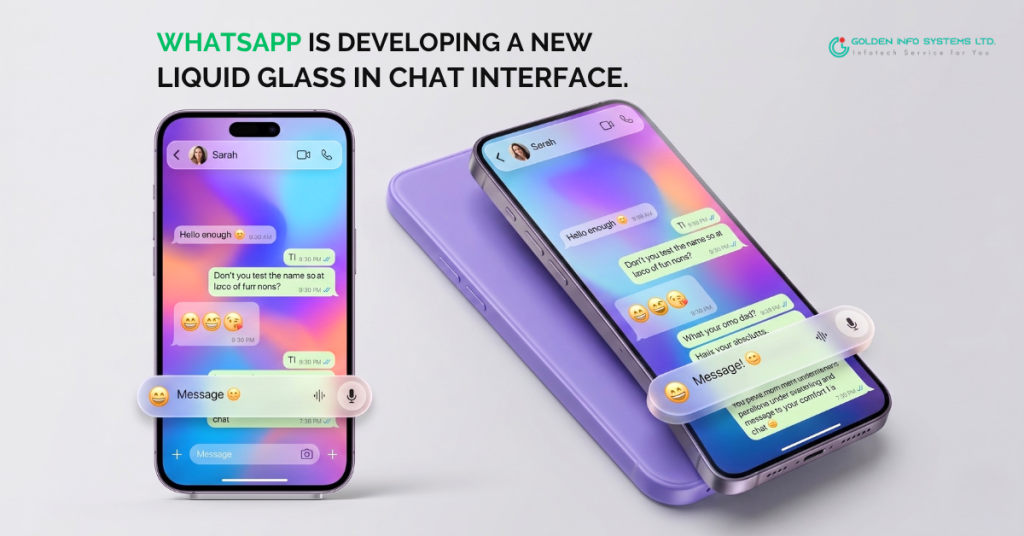
Right now, whatsapp is developing a new liquid glass in chat interface that is set to completely transform how you text, send voice notes, and interact with your friends, family, and colleagues. Gone are the days of solid, boring, flat colors blocking your beautiful chat wallpapers. Instead, Meta (the company that owns WhatsApp) is rolling out a stunning, translucent design that feels like it belongs in the future.
Whether you are a casual texter or someone who practically lives in their group chats, this massive update is going to change the way your screen looks and feels. In this massive, comprehensive guide, we are going to dive deep into exactly what this new design is, why it is happening, how it works, and how you can get it on your phone. Grab a cup of coffee, sit back, and let’s explore the beautiful new world of Liquid Glass.
Did You Know WhatsApp is Developing a New Liquid Glass in Chat Interface?
If you follow tech news, you might have heard whispers from beta testers and sites like WABetaInfo over the past few months. But what does it actually mean when we say whatsapp is developing a new liquid glass in chat interface?
To put it simply, WhatsApp is moving away from the “flat design” era. For years, the app has used solid color blocks for its top navigation bar (where the contact’s name is) and its bottom chat bar (where you type your messages). While this was clean and functional, it was starting to feel a bit outdated compared to the rest of the modern apps on your smartphone.
Enter “Liquid Glass.” This is a design style—often called glassmorphism by web and app designers—that uses frosted, semi-transparent backgrounds with a soft blur effect. Imagine looking through a slightly frosted window pane on a rainy day; you can see the colors and shapes behind the glass, but everything is softly blurred and beautiful. That is exactly what your WhatsApp chat screen is about to look like.
What Exactly is Glassmorphism?
Before we dive deeper, let’s understand the trend driving this change. Glassmorphism is an interface design trend that relies on four key elements:
- Translucency: A frosted-glass effect that lets you see through the elements.
- Vivid Backgrounds: It works best when there are colorful images or wallpapers behind the glass to highlight the transparency.
- Light Borders: A very thin, light border on the transparent objects to make them stand out just enough from the background.
- Shadows: Soft shadows that make the glass element look like it is floating above your screen.
By bringing this into your chats, WhatsApp is making sure your messaging experience feels fresh, layered, and incredibly high-tech.
Why WhatsApp is Developing a New Liquid Glass in Chat Interface for You
You might be wondering, “Why change something that isn’t broken?” WhatsApp is used by billions of people around the globe. When you have an app that popular, making a visual change is a massive undertaking. So, why are they doing this now?
1. Aligning with Apple’s iOS 26 Design Language
The biggest reason for this shift is Apple. With the release of iOS 26, Apple introduced “Liquid Glass” as a core part of its entire operating system. Apple wanted its system menus, widgets, and apps to feel layered and deep, taking inspiration from their spatial computing headsets. WhatsApp wants to feel “native” to your iPhone. This means when you switch from your iPhone’s home screen into WhatsApp, the app shouldn’t feel jarring or out of place. It should flow naturally with the rest of your phone’s design.
2. Reducing Visual Clutter
Solid, thick bars at the top and bottom of your screen take up a lot of visual real estate. They make your screen feel smaller and more boxed in. By switching to a translucent Liquid Glass design, your chat wallpaper stretches from the very top edge of your phone to the very bottom. The buttons and text simply float over it. This gives you an edge-to-edge viewing experience, making your phone screen feel larger and your chats feel less cramped.
3. A Premium, Modern Feel
Let’s face it: aesthetics matter. You spend hours every single day looking at WhatsApp. A beautiful app makes for a better user experience. The soft blurs, the smooth animations when you press a button, and the dynamic reflections all add up to an app that feels expensive and premium.
4. Enhancing Customization
Recently, WhatsApp has been putting a lot of focus on customization. They are rolling out features that let you choose custom chat themes, AI-generated backgrounds, and specific colors for different conversations. The Liquid Glass interface makes these custom wallpapers pop. Instead of hiding your carefully chosen background behind a solid green or grey keyboard bar, the new interface lets your wallpaper shine through the frosted glass.
Deep Dive: The Core Features of the WhatsApp Liquid Glass Update
Now that we know why this is happening, let’s look at exactly what is changing on your screen. The Liquid Glass update isn’t just one single change; it is a collection of thoughtful design tweaks that completely overhaul your chat screen.
1. The Floating, Frosted Chat Bar
The chat bar—the little box at the bottom of your screen where you actually type your messages—is getting the biggest glow-up. Currently, this bar sits totally flat at the bottom of the screen.
With the new update, the chat bar detaches from the bottom edge and becomes a “floating” pill-shaped box. Its background will be made of that translucent, frosted glass material. When you scroll through your messages, the text bubbles will slide underneath the floating chat bar, and you will be able to see the blurred colors of those messages passing through the frosted glass. It is a subtle effect, but it looks incredibly cool.
2. The Transparent Top Navigation Bar
Look at the top of your WhatsApp screen right now. You’ll see a solid bar showing the name of the person you are texting, their profile picture, and buttons for video and voice calls.
In the Liquid Glass update, this solid bar goes away entirely. It is replaced by a soft fade effect. Your chat wallpaper will stretch all the way to the top of your screen, right behind the status bar (where your battery and clock are). The contact’s name and the call buttons will simply float over the wallpaper with a soft, frosted glass backing to ensure you can still read the text clearly.
3. Dynamic Background Reflections
One of the coolest technical achievements of the Liquid Glass design is how it handles light and color. The translucent elements are “dynamic.” This means they react to whatever is behind them. If you have a bright yellow wallpaper, your frosted glass chat bar will have a warm, sunny tint to it. If you switch to dark mode with a dark blue starry night wallpaper, the glass will instantly adapt, becoming a sleek, dark, reflective blue. It brings your app to life in a way flat colors never could.
4. Redesigned Voice Note Player and Buttons
It isn’t just the big navigation bars getting this treatment. Every little button is being updated. The button you tap to scroll down to your newest messages? It’s getting the Liquid Glass treatment. The voice note player that pops up when someone sends you an audio message? It is also getting a frosted, curved redesign. Even the context menus—the little pop-ups that appear when you long-press a message to reply or react with an emoji—are adopting this soft, translucent look.
5. A Softer, Blended Keyboard
When you tap to type, your phone’s keyboard pops up. WhatsApp is working to ensure that the transition from viewing your chat to typing feels seamless. The edges where the keyboard meets the chat interface are being softened, and the keyboard background itself will feature subtle translucency to match the overall iOS 26 vibe.
How the Liquid Glass Interface Enhances Your Messaging Experience
You might think that design is just about making things look pretty, but great design actually changes how you feel when you use an app. The new Liquid Glass interface is packed with psychological and practical benefits for your everyday texting.
Creating a Focus-Friendly Environment
When an interface is chunky and filled with solid blocks of contrasting colors, it distracts your eyes. Your brain has to process the thick navigation bars, the colored text bubbles, and the keyboard all at once. By making the interface translucent, WhatsApp is effectively blending the tools (the buttons and bars) into the background. This allows your brain to focus entirely on the content: the messages, photos, and videos you are sharing with your loved ones. It creates a much calmer, less overwhelming reading environment.
Perfect Harmony with Dark Mode
If you are someone who keeps their phone in Dark Mode 24/7 to save battery and protect your eyes at night, you are going to love Liquid Glass. In older versions of the app, Dark Mode just meant the background turned black or dark grey. With Liquid Glass, Dark Mode becomes deep and multi-dimensional. The frosted glass elements take on a smoky, sleek appearance. When bright emojis or colorful photos scroll underneath these smoky glass panels, the visual effect is absolutely stunning without being harsh on your eyes in a dark room.
Making Group Chats Less Chaotic
Group chats can get wild. Messages flying in, multiple people replying, voice notes overlapping—it can be a lot to look at. The floating elements and softer borders of the Liquid Glass design help to visually organize the chaos. Because the interface elements feel lighter and less rigid, the fast-paced scrolling of a busy group chat feels smoother and less clunky.
How This Impacts Your Daily Messaging Experience
You might be wondering if a visual update really matters that much. The answer is a resounding yes! User Interface (UI) directly impacts User Experience (UX). Here is how the new Liquid Glass design will improve your daily life:
1. Reduced Visual Clutter
Solid blocks of color can make a screen feel cramped. By using translucent elements, the screen instantly feels larger and more breathable. It minimizes visual clutter, allowing you to focus entirely on the conversation itself rather than the bulky interface around it.
2. A More Personalized Vibe
Do you love using custom wallpapers for different chats? Maybe a picture of your pet, your partner, or a beautiful landscape? With the Liquid Glass floating chat bar, those wallpapers won’t be cut off at the bottom of the screen anymore. The blurred reflection of your wallpaper in the chat bar will make every single conversation feel uniquely customized.
3. Reduced Eye Strain
The soft, frosted aesthetics of the Liquid Glass design naturally diffuse harsh light, especially when you are using Dark Mode at night. The seamless blending of colors reduces the stark contrast that can often cause eye fatigue during long chatting sessions.
The Evolution of WhatsApp’s Design: From Flat to Liquid
To truly appreciate how big of a deal it is that whatsapp is developing a new liquid glass in chat interface, we have to look back at how far the app has come.
If you remember using WhatsApp a decade ago, you remember a very utilitarian app. It was designed purely for function. It had a classic, flat, slightly glossy look that was very common in the early 2010s. Over the years, Meta stripped away the gloss and embraced “Flat Design”—solid colors, sharp corners, and high contrast. This was clean, fast, and easy to run on older smartphones.
However, as smartphone screens got better—with OLED technology, higher refresh rates, and incredible color accuracy—flat design started to look a bit boring. Our screens are now capable of showing incredible depth, shadows, and millions of colors.
By introducing Liquid Glass, WhatsApp is finally taking full advantage of the amazing screen technology sitting in your pocket. It is a sign that WhatsApp isn’t just a basic texting tool anymore; it is a premium communication platform that cares about offering a top-tier user experience.
When Will You Get the Update?
Whenever a major app redesign is announced, the first question everyone asks is: “When will it be on my phone?” The answer depends heavily on what kind of smartphone you are holding.
The Apple Advantage: iOS 26 Users Go First
As of right now, the Liquid Glass update is heavily focused on Apple users, specifically those running iOS 26. Because Liquid Glass is a design language created by Apple, WhatsApp is utilizing the tools provided within Apple’s software to build this interface.
If you have an iPhone and keep your apps updated, you are at the front of the line. The rollout began slowly through the TestFlight beta program (with versions like 26.14.76) and is now gradually making its way to the public App Store. However, Meta is being very careful. They are rolling it out in phases to ensure there are no bugs, glitches, or performance issues. So even if your friend with an iPhone has it, you might still have to wait a few more weeks.
What About Android Users?
If you are part of the massive global Android community, you might be feeling a bit left out. Don’t worry! While the specific “Liquid Glass” branding is closely tied to Apple, Meta always strives for feature parity across platforms.
Android has its own version of modern, transparent design, heavily influenced by Google’s “Material You” design language. While the exact code and visual rendering might differ slightly on Android, WhatsApp is expected to bring a very similar floating, translucent chat bar and transparent navigation experience to Android devices in the near future. Beta testers on Android have already spotted early signs of UI tweaks that soften the app’s look. It may take a little longer, but a beautiful, modern chat interface is definitely on the horizon for Android users too.
How to Optimize Your Chats for the Liquid Glass Design
Once the update hits your phone, you want to make sure you are getting the most out of it. Because the interface relies so heavily on translucency and reflection, your choices inside the app matter more than ever. Here is how you can set up your WhatsApp to make the Liquid Glass design look its absolute best.
Step 1: Choose the Perfect Wallpaper
The secret to making glassmorphism look incredible is what lies beneath the glass. If you use a plain, solid black or white wallpaper, you won’t even notice the Liquid Glass effect.
- Use Colorful Backgrounds: Choose a wallpaper with a variety of vibrant colors. Nature scenes, abstract gradients, or colorful digital art work perfectly.
- Avoid Cluttered Images: If your background has too much sharp, tiny detail (like a dense crowd of people), it can make the frosted glass look messy. Smooth gradients or soft-focus photography are ideal.
- Try AI-Generated Backgrounds: WhatsApp is rolling out a feature allowing you to generate backgrounds using Meta AI. Try typing in prompts like “soft neon gradient” or “blurred watercolor sunset” to create the perfect backdrop for your new interface.
Step 2: Play with Chat Themes
If you have access to WhatsApp’s new Chat Themes feature, experiment with it! You can now assign different themes to different chats. Setting a warm, orange theme for your family group chat and a sleek, blue theme for your work chats will allow you to see how the Liquid Glass dynamically adapts its color reflections as you switch between conversations.
Step 3: Check Your Display Settings
Make sure your phone’s brightness and contrast settings are optimized. If your screen is too dim, the subtle shadows and blurs of the Liquid Glass interface will be lost. Turning on “True Tone” (on iPhones) can also help the colors look more natural and pleasing to the eye.
How to Get the WhatsApp Liquid Glass Update
Are you eager to get your hands on this sleek new design? While you cannot force a server-side update, there are several steps you can take to ensure you get it the moment it becomes available for your account.
1. Update Your Operating System: The Liquid Glass design is heavily tied to the newest system tools. Go to your phone’s settings and make sure you are updated to the latest version of your operating system (like iOS 26).
2. Update WhatsApp via the App Store: Open the Apple App Store or Google Play Store. Search for WhatsApp. If you see an “Update” button next to the app, tap it! You want to make sure you are running the absolute newest version of the app.
3. Be Patient with Server-Side Rollouts: Sometimes, even if you have the latest app version downloaded, the new design won’t show up. This is because Meta flips a digital switch on their end (server-side) to turn the feature on for batches of users. Check back every few days!
4. Keep an Eye on the Bottom Tab Bar: The easiest way to tell if the update has hit your phone is to look at the main navigation bar at the very bottom of the app (where it says Chats, Updates, Communities, Calls). If that bar looks like a floating, frosted piece of glass rather than a solid block of color, congratulations! You have the Liquid Glass update.
5. Consider the Beta Program (If Available): If you are truly impatient and love living on the cutting edge, you can look into joining WhatsApp’s beta program via TestFlight (for iOS) or the Google Play Console (for Android). Just be warned: beta versions can sometimes have bugs or crash unexpectedly!
What Other Exciting Design Changes Are Coming to WhatsApp?
The fact that whatsapp is developing a new liquid glass in chat interface is just the tip of the iceberg. Meta is on a mission to completely modernize the app. Here are a few other design changes and features rolling out alongside or shortly after the Liquid Glass update:
- Status Updates at the Top: Just like Instagram and Facebook Stories, WhatsApp is testing moving Status updates to the very top of your chat list, making them much more visible and engaging.
- Custom Lists: You will soon be able to filter your chats more easily by creating custom lists (e.g., “Coworkers,” “Gym Buddies,” “Family”), making navigation a breeze.
- Media Quality Control: A new interface toggle is appearing that lets you easily choose whether to send photos and videos in Standard quality (to save data) or HD quality (for crisp, high-resolution sharing).
- In-App Translation: A seamless, private, on-device translation tool is being built directly into the chat interface, breaking down language barriers instantly without needing to copy and paste text into Google Translate.
All of these features, combined with the gorgeous new translucent aesthetics, prove that WhatsApp is not slowing down. They are constantly innovating to ensure they remain the world’s favorite messaging app.
Community Reactions: Do Users Love the Glassmorphism Look?
Whenever a major app changes its design, the internet always has a lot to say about it. The response to the new translucent UI has been largely positive, but it has definitely sparked some fun debates online.
On platforms like Reddit and Twitter, many users are absolutely thrilled. One user noted, “I know some people hate change, but Liquid Glass is the best UI update I’ve seen in a long time. It just looks so premium and clean.” Many people feel that the old flat design was starting to feel a bit cheap, and the new frosted look makes texting feel fun again.
On the flip side, some users—particularly on Android—are feeling a bit left out. They are hoping the feature makes the jump to Android quickly, but worry about whether budget smartphones will be able to handle the graphics smoothly. Furthermore, a few long-time users always prefer the classic, no-nonsense look and wish they had a simple toggle button to turn the new design off.
Overall, however, the shift toward a modern, translucent, and highly responsive interface is being celebrated as a massive step in the right direction for the world’s most popular messaging platform.
(FAQs) About the WhatsApp Liquid Glass Update
To wrap up this ultimate guide, let’s answer the most common questions users are searching for regarding this massive design shift.
What exactly is the WhatsApp Liquid Glass interface?
The Liquid Glass interface is a major design update for WhatsApp that replaces solid, flat color bars with translucent, frosted-glass-like elements. It makes the chat bar, top navigation, and menus look like they are floating over your wallpaper, dynamically reflecting the colors behind them for a modern, 3D aesthetic, primarily for iOS devices.
Why haven’t I received the new Liquid Glass update on my phone yet?
Meta (WhatsApp’s parent company) uses a “phased rollout” approach for major visual changes. This means they release the update to a small percentage of users first to ensure there are no bugs or crashes. If your phone’s operating system and your WhatsApp app are fully updated, you simply need to be patient. It will arrive on your device in the coming weeks.
Is the Liquid Glass design only available for iPhones (iOS)?
Currently, the Liquid Glass branding and specific visual effects are tightly integrated with Apple’s iOS 26 design language. Therefore, iPhone users are seeing it first. However, WhatsApp aims for visual consistency across platforms, so a similar modern, transparent, and floating interface is expected to be developed and rolled out for Android users as well.
Will the translucent design drain my phone battery faster?
No, you shouldn’t notice a significant drop in battery life. While rendering translucency and blur effects requires slightly more graphical processing power, modern smartphones handle this effortlessly. Furthermore, because Liquid Glass looks incredible in Dark Mode, utilizing Dark Mode on an OLED screen will still save you a considerable amount of battery life.
Can I turn off the Liquid Glass interface if I prefer the old flat design?
Historically, WhatsApp does not provide a toggle switch to revert to older interface designs once a global rollout is complete. The new interface will eventually become the standard look for the app. However, you can minimize the translucent effect by choosing a solid, flat-color wallpaper for your chats, which removes the visual depth created by complex background images.
How does the new chat bar work?
Instead of being attached to the very bottom edge of your screen, the new chat input bar “floats” slightly above the bottom edge. When you scroll through your chat history, you will see your older messages slide neatly behind the frosted glass of the floating chat bar, creating a beautiful layered effect.
Does this update change how I send messages or voice notes?
No! The core functionality of WhatsApp remains exactly the same. Your chats are still end-to-end encrypted, and you still tap the microphone icon to send voice notes or the paperclip/plus icon to attach files. The Liquid Glass update is purely a visual “skin” that changes how the app looks, not how it works.
A Beautiful New Era for Messaging
Change is not always easy, especially when it happens to an app you use dozens of times every single day. But the fact that WhatsApp is developing a new liquid glass in chat interface is something to be genuinely excited about.
By embracing modern design trends like glassmorphism, floating navigation bars, and soft, translucent layers, WhatsApp is ensuring that your daily communication feels as beautiful as it is reliable. It perfectly complements the broader tech trends we are seeing in 2026—from cloud scalability to digital growth—proving that Meta is committed to keeping their infrastructure and their user experience completely cutting-edge.
So, keep an eye on your App Store updates. The next time you open a chat to text a friend, you might just be greeted by a gorgeous, floating, liquid glass screen!