




Choosing custom software vs off the shelf comes down to one question: does a ready-made product already fit the way your business makes money? If it covers 80% or more of your workflow and the gaps are cosmetic, buy it. If the gaps sit in the process that sets you apart from competitors, or the per-user fees will outgrow a one-time build within three to five years, build it (or build the part that matters and buy the rest).
That’s the short answer. The longer one depends on numbers you can actually calculate: license costs at your real headcount, integration work, data ownership, and how fast you need to go live. This guide walks through each factor, gives you a comparison table and a worked five-year cost example, then hands you a checklist you can run in a single afternoon with your team.
We wrote it from the vendor side of the table. At Golden Info Systems we build custom systems, but we also tell clients to buy a subscription when that’s the cheaper, faster answer, so the advice below is meant to hold up even if you never talk to us.
1. Custom Software vs Off the Shelf: What Each Option Means for Your Business
Before comparing, it helps to pin down the two terms, because sales pages often blur them.
What off-the-shelf software is
Off-the-shelf software (often called COTS, for “commercial off-the-shelf”) is a finished product sold to many customers at once. Think QuickBooks for accounting, HubSpot or Zoho for CRM, Shopify for online stores, or Slack for team chat. You pay a license or subscription, configure settings, and start working. The vendor owns the code, decides the roadmap, and ships updates on its own schedule.
Configuration is allowed. Real change usually isn’t: you can rename fields and build reports, but you can’t rewrite how the product handles approvals or pricing rules unless the vendor exposes that option.
What custom software is
Custom software is built for one organization’s specific processes. You (or a development partner) define the requirements, the team designs and codes to them, and you own the result, including the source code if your contract says so. Examples include a loan-processing system built around a lender’s own credit rules, a dispatch tool that matches a logistics firm’s routing logic, or an internal portal that pulls data from five legacy databases into one screen.
The main custom software development benefits are fit and ownership, including control over the roadmap. The price is a larger upfront budget and a longer wait before go-live; after launch, you’re also responsible for maintaining what you built.
Why the choice matters more in 2026
Subscription spending keeps climbing. In its November 2024 forecast, Gartner projected worldwide SaaS end-user spending of $299.1 billion in 2025, up from $250.8 billion in 2024. Those are worldwide figures, but the effect reaches small companies too, because every new tool adds another monthly line item.
The Zylo 2026 SaaS Management Index found that organizations spend an average of $55.7 million a year on SaaS, 8% more than the year before, while the average portfolio held steady at 305 applications. Spend is rising faster than app counts. That’s the backdrop for any build vs buy software decision today: subscriptions are easy to start and hard to control once they pile up.
Quick examples by business type
Seeing custom software vs off the shelf play out in real sectors makes the trade-off easier to judge. These are typical patterns, not rules:
- Retail shop with one outlet: off-the-shelf POS and accounting. The process is standard and the team is small.
- Distributor with 200 dealers and tiered pricing: custom order and pricing module, connected to packaged accounting. Dealer-specific discounts rarely fit generic tools.
- Private clinic: a packaged hospital or clinic system first, with custom work limited to reports or integrations the product lacks.
- Fintech startup: custom core (onboarding, ledger, risk rules), because that logic is the product; bought tools for support tickets and email.
- Education consultancy: a niche industry product usually fits better than a generic CRM, since student files, university applications and visa stages are specific to that trade.
Notice that almost none of these is purely one or the other.
2. Key Factors in the Custom Software vs Off the Shelf Decision
Seven factors decide most cases, and together they make up the build vs buy software decision. Score each one honestly and the answer usually becomes obvious.
Fit with your actual workflow
Map the process first, then look at software. List every step a job goes through (for a clinic, that might be booking, check-in, consultation, lab order, billing, and follow-up) and mark which steps the product handles out of the box.
A useful rule of thumb we apply in scoping: if a ready-made product covers at least 80% of the steps without workarounds, buy it. Below 60%, you’ll spend the difference on spreadsheets, manual re-entry, and staff who “just know” how to trick the system. Between 60% and 80%, look hard at the hybrid option in Section 3.
Total cost of ownership over three to five years
Sticker price misleads in both directions when you compare custom software vs off the shelf. A subscription looks cheap in month one; a custom build looks expensive in month one. Neither tells you what you’ll spend by year five.
For off-the-shelf tools, add up licenses at your expected headcount (not today’s), paid add-ons, implementation or configuration fees, integration middleware such as Zapier or a paid connector, training, and annual price increases at renewal. For custom software, add the build cost, hosting, and yearly maintenance. Industry practice budgets maintenance at roughly 15% to 20% of the original build cost per year; treat that as a planning estimate, not a quote.
Time to value
A SaaS product can be live in days. A custom system usually takes weeks for a small tool and several months for a full business platform. If a regulator, investor, or peak season is forcing a date, that alone can push you toward buying first and building later.
Integration with the systems you already run
Most businesses already have an accounting package, a payment gateway, a CRM, and a few spreadsheets that hold everything together. Check whether the product has a documented REST API, webhooks, and native connectors for the tools you use. If it doesn’t, you’ll pay for custom integration anyway, which removes much of the reason to buy.
Data ownership, security and compliance
Ask three concrete questions of any vendor. Where is my data stored (country and provider)? Can I export all of it, in a usable format such as CSV or JSON, at any time? What happens to my data if I cancel? For banks, hospitals, and anyone handling payment or health records, local data-residency rules may rule out some hosted products entirely.
Custom software gives you full control here, though it also makes you responsible for security patches, backups, and access controls.
Scale and pricing model
Per-user pricing punishes growth. A tool that costs a few hundred dollars a month for ten users can cost thousands at a hundred. Usage-based pricing (per transaction, per API call, per AI credit) can spike without warning; Zylo’s 2026 report notes that 78% of IT leaders saw unexpected charges tied to AI features or consumption-based pricing.
Custom software costs roughly the same whether ten or a hundred people log in, apart from hosting.
Vendor stability and exit risk
Every subscription is a bet on the vendor. Products get acquired, repriced, or retired, and a smaller vendor may simply stop answering tickets. Before you commit, check how long the product has been on the market, whether pricing changes in the past two years were announced with notice, and what the contract says about data return after termination.
For custom work, the equivalent risk is depending on one developer. You cover it by owning the repository, the hosting account, and the documentation from day one, so another team could pick the project up if needed.
Competitive differentiation
This is the factor most teams skip. If the process is the same across your industry (payroll, email, bookkeeping), buy. Nobody wins customers because their payroll runs on bespoke code. If the process is how you win (your quoting engine, your matching algorithm, your customer portal), owning it gives you room to improve it faster than a vendor that serves your competitors too.
3. Custom Software vs Off-the-Shelf Comparison Table
Here’s the full custom software vs off-the-shelf side-by-side. Use it as a starting sheet for your internal discussion.
| Factor | Off-the-shelf software | Custom software |
|---|---|---|
| Upfront cost | Low (subscription or license, plus setup) | High (design, development, testing) |
| Ongoing cost | Rises with users, add-ons and renewals | Hosting plus roughly 15% to 20% of build cost a year (estimate) |
| Time to go live | Days to a few weeks | Weeks for small tools; months for full platforms |
| Fit with workflow | Generic; you adapt to the software | Exact; the software adapts to you |
| Integration | Limited to vendor APIs and connectors | Built for your exact stack |
| Data ownership | Vendor-hosted; export terms vary | You own and host it |
| Roadmap control | Vendor decides | You decide |
| Scaling cost | Grows with every seat | Mostly flat apart from hosting |
| Support | Vendor help desk, shared with all customers | Your team or a contracted partner |
| Vendor risk | Price rises, feature removal, shutdown | Dependence on the developer unless you hold code and docs |
| Best for | Standard processes, small teams, tight deadlines | Core processes, growing teams, unusual workflows |
A worked five-year cost example (hypothetical)
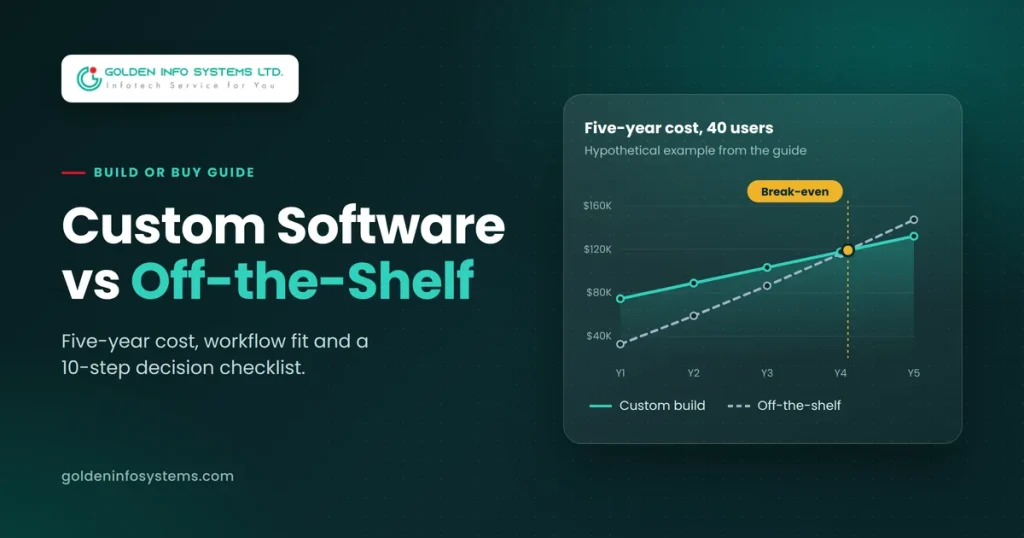
To put custom software vs off-the-shelf costs side by side, here is a hypothetical example with round numbers. A 40-person company is choosing between a SaaS operations tool at $45 per user per month and a custom build. Assumptions: 7% price increase at each annual renewal, $8,000 one-time configuration, $3,000 a year for integration connectors; the custom build costs an estimated $60,000, with $3,600 a year for hosting and $10,800 a year (18% of the build) for maintenance.
| Year | Off-the-shelf (yearly) | Off-the-shelf (cumulative) | Custom (yearly) | Custom (cumulative) |
|---|---|---|---|---|
| 1 | $32,600 | $32,600 | $74,400 | $74,400 |
| 2 | $26,112 | $58,712 | $14,400 | $88,800 |
| 3 | $27,730 | $86,442 | $14,400 | $103,200 |
| 4 | $29,461 | $115,903 | $14,400 | $117,600 |
| 5 | $31,313 | $147,216 | $14,400 | $132,000 |
At 40 users, the subscription stays cheaper until year five. At 80 users, the license line doubles and custom pulls ahead during year two. At 15 users, the subscription wins for the whole period. Plug in your own headcount and quotes; the break-even point moves a lot.
A simple scoring sheet
If the cost sheet is close, score the non-financial factors. Give each factor a weight that reflects your business, rate both options from 1 to 5, multiply, and add up. The sample weights below are a starting point only; a regulated business should weight data control higher, a startup racing to launch should weight time to value higher.
| Factor | Sample weight | Off-the-shelf score (1 to 5) | Custom score (1 to 5) |
|---|---|---|---|
| Workflow fit | 25% | Rate from your trial | Usually 4 to 5 |
| Five-year cost | 20% | From your cost sheet | From your cost sheet |
| Time to value | 15% | Usually 4 to 5 | Usually 2 to 3 |
| Integration | 15% | Depends on API quality | Usually 4 to 5 |
| Data control and compliance | 15% | Depends on vendor terms | Usually 5 |
| Vendor or developer risk | 10% | Check vendor history | Depends on code handover |
A gap of less than 10% between the totals means either option can work, so pick the faster one. A bigger gap usually settles the custom software vs off the shelf question on its own.
The hybrid option
Many businesses settle custom software vs off the shelf with a mix. They buy commodity functions (accounting, email, HR) and build the piece that carries their business logic, then connect the two through APIs. A study abroad agency might keep a standard accounting package while running student leads and visa files through a purpose-built system. An e-commerce brand might run Shopify for checkout while a custom service handles wholesale pricing rules that Shopify can’t express.
Hybrid keeps upfront costs lower and gets you live sooner. You own only the code that’s worth owning.
4. Step-by-Step Checklist: Choosing Custom Software vs Off the Shelf
Run these steps in order for any custom software vs off-the-shelf choice. Most teams can finish steps one to five in a week.
- Write down the problem in one sentence. “Our sales team loses leads because follow-ups live in three different inboxes” is a problem. “We need a CRM” is a guess at a solution.
- Map the workflow. List every step, who does it, what data it needs, and which system holds that data today. A whiteboard photo is enough.
- Split must-haves from nice-to-haves. Limit must-haves to the features without which the process fails. Ten is a healthy maximum for a first version.
- Shortlist three ready-made products. Run free trials with real data and real users. Record the percentage of must-haves each one covers without workarounds.
- Test the exit. During the trial, export your data. If the export is partial, locked behind a higher tier, or in a proprietary format, note it as a risk.
- Get one custom estimate. Share the same must-have list with a development partner and ask for a phased quote: a first release covering only the must-haves, then later phases.
- Build a five-year cost sheet. Use the structure from the example above. Use the headcount you expect in year three, not today’s.
- Score strategic value. For each process, ask whether doing it better than competitors would win you customers. If yes, lean custom for that piece.
- Decide per module, not per company. It’s normal to buy accounting and build the order-management layer.
- Set a review date. Put a calendar reminder 12 months out to recheck costs, usage, and fit. Decisions made at 20 users often need revisiting at 60.
5. Common Mistakes to Avoid
These are the mistakes we see most often when companies come to us after a first attempt at custom software vs off-the-shelf went wrong.
Comparing year-one costs only. The subscription almost always wins year one. Run the five-year sheet before you sign anything longer than a monthly plan.
Underestimating ready-made software limitations. The ready-made software limitations that hurt most rarely show up in a demo. They appear in month four, when you need a report the product can’t build, an approval step it doesn’t support, or an integration it only sells on the enterprise plan. Trial with your hardest real case, not the vendor’s sample data.
Over-customizing a SaaS product. Some teams buy a platform and then pay consultants to bend it with scripts and plug-ins until it’s effectively custom software, without the ownership. Every vendor update can break those add-ons.
Building what you could buy. Writing your own email system, chat tool, or general ledger rarely pays off. Keep custom budgets for the processes that make you money.
Skipping the handover plan. If you build, your contract should give you the source code, deployment scripts, database schema, and documentation. Without them you’re locked in to a developer instead of a vendor, which is no better.
Starting with the full wish list. A custom project with 60 features and a single launch date carries far more risk than one with ten must-haves and a phased roadmap. Ship the core, measure how people use it, then extend.
Letting one department decide alone. Finance tends to pick the cheapest license; operations tends to want the perfect fit. Put someone from each group, plus whoever owns IT, in the same review so the trade-offs are argued once instead of after go-live.
Treating the choice as permanent. The right answer for custom software vs off the shelf at 15 staff is often different at 80. Plan the review date from step 10 of the checklist and keep your data portable so switching stays affordable.
Ignoring the people side. Neither option works if staff keep using their old spreadsheets. Budget time for training, and pick one person to own adoption.
6. How Golden Info Systems Approaches the Build vs Buy Question
At Golden Info Systems (GISL), we’ve spent 12+ years building software from Dhaka, with 850+ projects completed. We’re a BASIS member and also belong to the Bangladesh Computer Samity, e-CAB, and DevEx. Our team is fully in-house, with no freelancers on client work.
Our first conversation with a client is usually about whether they need us at all, and we treat custom software vs off the shelf as an open question until the numbers answer it. If an existing product covers the job, we say so. When a build does make sense, our custom software development services cover consulting, custom and enterprise software, software product development, custom CRM development, and software integration and APIs. That last item matters for hybrid setups, where most of the work is connecting a bought tool to a built one.
Every project runs through the same four phases:
- Requirements. We document your workflow, must-haves, users, and existing systems, then turn them into a written scope.
- Planning. We choose the architecture and stack (our team works in Java, Python, React, Angular, Vue.js, Flutter, Swift, and more), then set phases, milestones, and a budget.
- Execution. We design and build in short cycles, with working demos so you see progress instead of status reports.
- Delivery. We test, deploy, train your team, and hand over code and documentation, with support after launch.
We also build our own products, which gives us a view from both sides of the build vs buy software decision. Our products, G-CRM Study Abroad and G-Association, are ready-made systems for education consultancies and membership bodies. They show where a niche product can beat both generic SaaS and a from-scratch build. If you’re weighing ERP in particular, our guide to the best ERP software in Bangladesh compares packaged options first. International clients who want to build offshore can read why global companies outsource software development to Bangladesh.
7. Frequently Asked Questions
What is the main difference between custom software vs off the shelf?
Off-the-shelf software is a finished product sold to many customers; you configure it but can’t change how it fundamentally works. Custom software is designed and coded for one organization’s processes, and that organization usually owns it. The trade-off is speed and low upfront cost for ready-made products against fit, ownership, and flat scaling costs for custom builds. Many businesses combine the two, buying standard functions and building the parts that set them apart.
What are the disadvantages of off-the-shelf software?
The common drawbacks are features you pay for but never use, gaps in the features you need, per-user fees that rise as you grow, limited integration options, and dependence on the vendor’s roadmap and pricing. Data export can also be restricted by plan tier. Some products get discontinued or acquired, forcing a migration you didn’t plan. None of these rule out buying; they’re the costs to price into your comparison.
What are the biggest custom software development benefits?
The biggest custom software development benefits are exact fit with your workflow, full ownership of code and data, freedom to change the product whenever your business changes, and costs that stay mostly flat as headcount grows. Custom systems also integrate cleanly with your existing tools because they’re built for your stack. The downside is a larger upfront budget and a longer path to launch, which a phased first release can shorten considerably.
How much does custom software cost vs off-the-shelf?
There’s no single figure; price depends on scope, integrations, compliance needs, and where the team is based. As a rough planning estimate, a small internal tool might run $15,000 to $50,000, a mid-size business system $50,000 to $150,000, and enterprise platforms more. Off-the-shelf tools often cost $10 to $100+ per user per month. Compare both over five years at your expected headcount, using real quotes, before deciding.
How long does it take to build custom software?
A focused first release with around ten must-have features commonly takes eight to sixteen weeks. Larger platforms with many integrations, user roles, and compliance requirements can take six months or more. In the custom software vs off the shelf trade-off, speed favors buying. Build timelines stretch mostly because of unclear requirements and scope added mid-project, so a written scope and a phased roadmap are the best ways to keep dates realistic. Off-the-shelf tools, by contrast, can be live within days.
When should a small business choose custom software vs off the shelf?
A small business should usually start with off-the-shelf tools for standard jobs like accounting, email, and payroll. Custom software makes sense when a core process doesn’t fit any product, when you’re paying for several tools and gluing them together by hand, or when per-user fees are about to jump because you’re hiring. A small, phased custom build around one core process is often the right first step.
Can I switch from off-the-shelf to custom software later?
Yes, and many companies do. Starting with a subscription lets you learn what you really need before paying for a build. To keep the option open, choose products with full data export and a documented API, and keep your own records of workflows and custom fields. When you move, plan a data migration phase and run both systems in parallel for a few weeks.
8. Practical Next Step
Take one hour this week and write down the ten must-have features for the process that’s causing you the most pain, along with your expected headcount in two years. Then send that list to our team through the Golden Info Systems contact page and ask for two things: an honest opinion on whether an existing product would do the job, and a phased quote if it wouldn’t. With those two numbers side by side, your custom software vs off the shelf decision stops being a debate and becomes a cost sheet.